


 Add Line
Labels for Safety, Visuals and Facility ID Desktop Printers
Labels for Product, Wire and Lab ID Benchtop Printers
 This product is in your cart. We'll update the quantity.
Labels for Safety, Visuals and Facility ID Desktop Printers
Labels for Product, Wire and Lab ID Benchtop Printers
Safety and Facility ID Desktop Printers
Product, Wire & Lab ID Desktop Printers
General Purpose Barcode Scanner & Accessories
Barcode Scanner and Printer Kits
PaintStripe Floor Marking Stencils
Valve Lockouts & Hose Lockouts
Group Lock Boxes & Permit Control
Maintenance and Production Tags
Calculators and Assessment Tools
Product Finders and Data Sheets
Workplace Safety & Efficiency Topics
{{displayName}}
from $1,849.00 (USD) / Each
{{selectedProduct.FormattedListPrice}} (USD) / {{selectedProduct.UnitOfMeasure}} ( {{selectedProduct.FormattedPriceInclTax}})
Choose your options below for full product details
{{familyProduct.Title}}
|
Compare
|
|||
|---|---|---|---|
| {{product.CalculatedCatalogNumber}} | {{attribute.value}} |
{{product.FormattedListPrice}}
( {{product.FormattedPriceInclTax}})
Contact Customer Service
|
from $1,849.00 (USD) / Each
{{selectedProduct.FormattedListPrice}} (USD) / {{selectedProduct.UnitOfMeasure}}
{{selectedProduct.FormattedPriceInclTax}}
Choose product options above for your price.
Part Number:
{{selectedProduct.CalculatedCatalogNumber}}
{{selectedProduct.OverviewDescription}}
Set up shop anywhere with the i4311 Transportable Industrial Desktop Label Printer — the first 4" wide label printer with an all-day battery and ergonomic carrying handle.


Developed through rigorous R&D and direct user feedback, the i4311 delivers performance and versatility you won't find anywhere else — all to eliminate your biggest labeling bottlenecks and frustrations.
Drive efficiency, minimize risk and boost compliance
Key applications:
Master the jobsite and your billable hours
Key applications:
Seamlessly move between work cells and eliminate rework
Key applications:
Increase workflow speed while protecting data accuracy
Key applications:
The i4311 includes Brady Workstation desktop software. You can also design labels right from your phone with the Express Labels Mobile app or print directly from your software systems with our SDK.
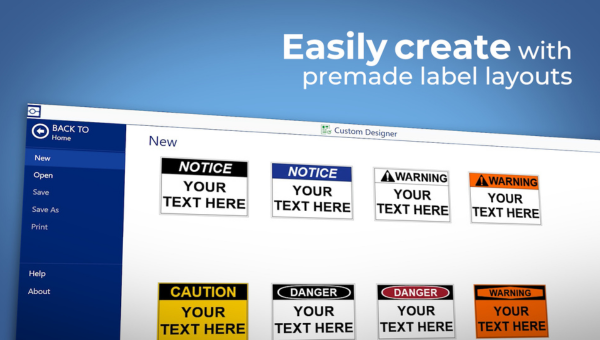
Brady Workstation is the powerful, included software that ensures fast setup with LabelSense auto-detection, allowing for one-click label printing for all your professional product and wire identification needs.
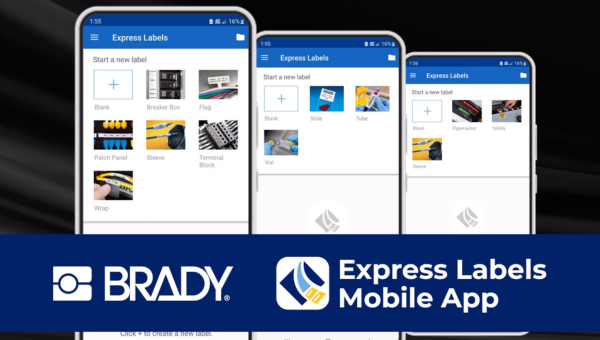
Design, view, and print labels right from your mobile device for maximum on-site efficiency. Key features like BradyVoice for simple dictation and Image-to-Text for turning photos into label content eliminate manual data entry.
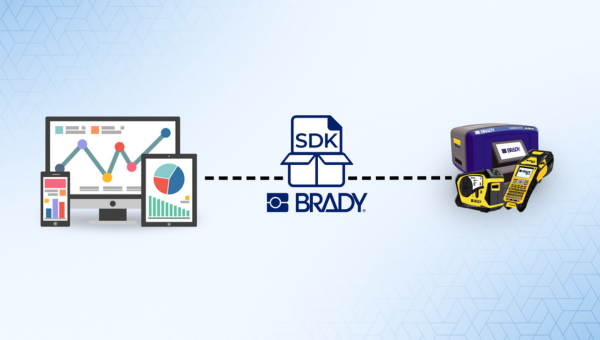
Your data. Your software. Brady printers. Integrate the Brady SDK into your current app- or web-based software for a seamless way to get label data to a Brady printer.
Discover some of the most popular label materials compatible with the i4311. The table below shows each material type and the applications where it performs best, making it simple to find the right solution for your project.

Indoor/Outdoor
|

Safety
|

Harsh Environment
|

Lean/5S
|

Electrical & Datacom
|

Frozen Surface
|
|
|---|---|---|---|---|---|---|
| B-595 | All-Weather Vinyl | Yes |
Yes |
Yes |
Yes |
Yes |
No |
| B-342 | PermaSleeve Heat Shrink | No |
No |
Yes |
No |
Yes |
No |
| B-427 | Self-Laminating Vinyl | No |
No |
No |
No |
Yes |
No |
| B-593 | Raised Panel | No |
Yes |
No |
No |
Yes |
No |
| B-569 | Low-Halide Multi-Purpose Polyester | Yes |
No |
Yes |
No |
No |
No |
| B-7569 | Durable Vinyl Film | Yes |
Yes |
Yes |
No |
No |
No |
| B-7643 | Zero Halogen Polyurethane Tags | No |
Yes |
Yes |
No |
Yes |
No |
| B-492 | FreezerBondz Cryogenic Polyester | No |
No |
Yes |
No |
No |
Yes |
Your printer likely needs to be "woken up" from its shipping state. Please follow these two steps:
No. The printer requires the battery to be installed and charged to at least 10% for it to operate.
Yes. Simply plug the charging cable into the printer’s USB-C power port marked with the lightning bolt.
Use one of these helpful guides to find the right label:
This typically occurs if you're using an older roll of material with a legacy smart-cell chip that the i4311 doesn't recognize. Please contact the Technical Support Team for assistance. Our team can guide you through the process of replacing the chips on your existing rolls to make them compatible with the i4311.
Yes. The i4311 can act as a standalone workstation. You can store your files and templates directly on the printer's internal memory. Then, you can open and edit the data fields directly using the 7-inch touchscreen anywhere you take the printer.
All files and templates are stored on an onboard Embedded Multimedia Card (eMMC).
No. Currently, the system only supports corded connections via a direct USB cable or a corded charging cradle.
Yes. You can use any brand of scanner as long as it connects via a corded USB interface.
Visit our Tech Support page to submit an online request or browse troubleshooting guides. For urgent inquiries, call our Technical Support Team directly at 1-800-643-8766.
Routine maintenance includes upgrading firmware and updating printer label library values. Additionally, we recommend cleaning the printer, printhead, platen roller and sensors after each roll of labels is used. Check out this how-to video for step-by-step cleaning instructions.
Users can upgrade the printer firmware and label library by visiting this link and following the instructions.
The i4311 Printer has a five-year warranty.
{{attributesGroup.Name}}
| {{attributesGroup.Name}} | {{attribute.AttributeName}} {{attribute.AttributeName}} |
Please choose your options above to view specifications.
Access how-to videos, literature, firmware & drivers, software, related articles, FAQs and additional support


Don't lose your favorites!
You're browsing as a guest. Sign in or Create an Account to save your favorites for your next visit.

 ? selectedProduct.WebLargeImage : 'https://d37iyw84027v1q.cloudfront.net/na/bradyid/BradyID_Large/i4311_img045b.jpg'}})


